Medical Interface Design for Embedded World 2025

My Role in the Team
01
Research
Empathize:
Understand their audience as a user personas, observe who they interact with the product.
Definition:
Identify their different pain points and synthesise in a main problem statement. Then decide what issues are we able to solve with in the project scope.
02
UI Design
Ideate:
Start looking for solutions for problems by sketching, finding inspiration and identifying design patterns.
Prototype:
From wireframes to high fidelity prototypes we started to decide one final solution to present to the client.
03
Hand-off
Collaboration with developers:
We actively collaborated to prioritize functionalities and determine implementation strategies. Consistent communication was vital from ideation onward, given the strict hardware constraints (C++ embedded device)
Discovery
Business Goals
The Business Developer interviewed the client and found that Embedded devices often suffer from unattractive UIs, but LVGL shows that great interfaces are possible on limited hardware.
Toradex asked LVGL for a demo highlighting advanced embedded UI design to impress medical device manufacturers. They also believe familiar UIs increase user comfort and effectiveness.
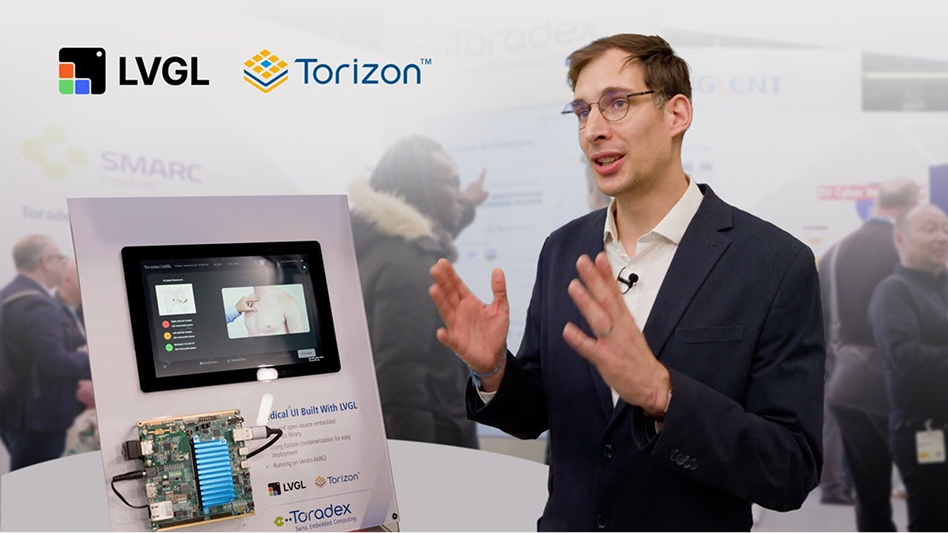
Gábor Kiss-Vámosi (LVGL’s CEO) explaining our Medical Demo at the Embedded World 2025 trade Fair in Nuremberg.
KEY INSIGHT
We need to keep clinicians in mind, but our real users will be a med-tech expert walking busy in a trade fair.
Empathy
Given the reduced time and economic resources for this project, I decided to start the research using AI for a fast information gathering.
After providing the whole context to the AI, I’ve asked for a research plan trying to challenge the stakeholder assumptions

Icon created by kakhim
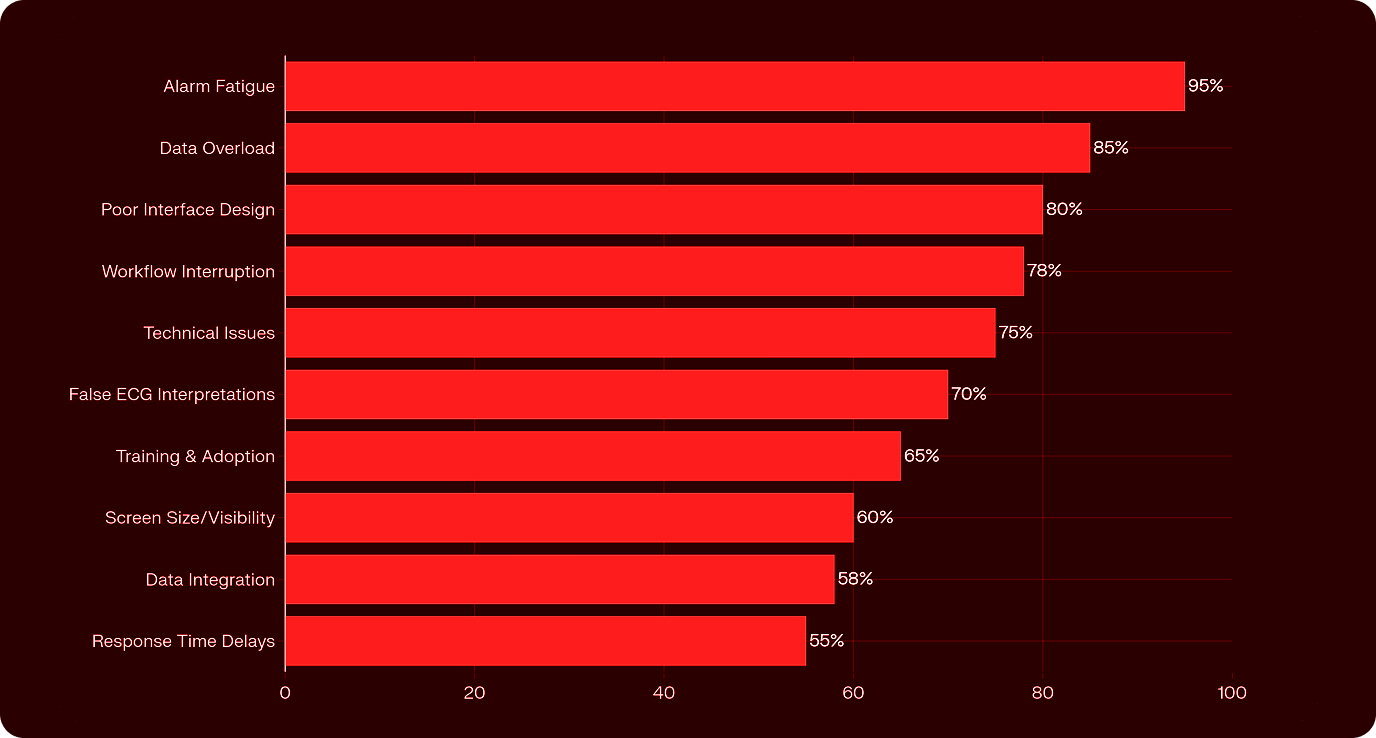
Doctor Pain Points
The research covered many different aspects, but guided by my intuition, I decided to focus on the issues our product is best positioned to address.
- Alarm fatigue (70-94% false alarms)
- Data overload (over 70% of clinicians affected)
- Visibility problem with the screen.
- High Learning Curve.
Shadowing users on Youtube Videos
What I discovered:
- Doctors constantly hunt for basic functions buried in complex menus
- Mode switching varies wildly between devices (dropdowns, physical buttons, keyboard shortcuts)
- Most interfaces feel like 1990s software compared to smartphones
Identified Pain Points
We selected these pain points from our research, focusing on three that could be quickly solved using our client’s hardware and the LVGL graphics library for fast, interactive refreshes.

Data Overload
ICU monitors generate vast, continuous data streams that can overwhelm clinicians, causing cognitive strain and increasing the risk of errors.

Alarm Fatigue
ICU monitors generate vast, continuous data streams that can overwhelm clinicians, causing cognitive strain and increasing the risk of errors.

Low Visibility
Clinical environments present unique display challenges, as varying lighting conditions from bright surgical lights to dimmed patient rooms
Definition
PROBLEM STATEMENT
A frontline clinician is a time-pressured healthcare professional who needs to quickly identify critical patient status changes in a clear and direct way because, otherwise alarm fatigue, data overload, and poor screen visibility can drain his decision-making capabilities.
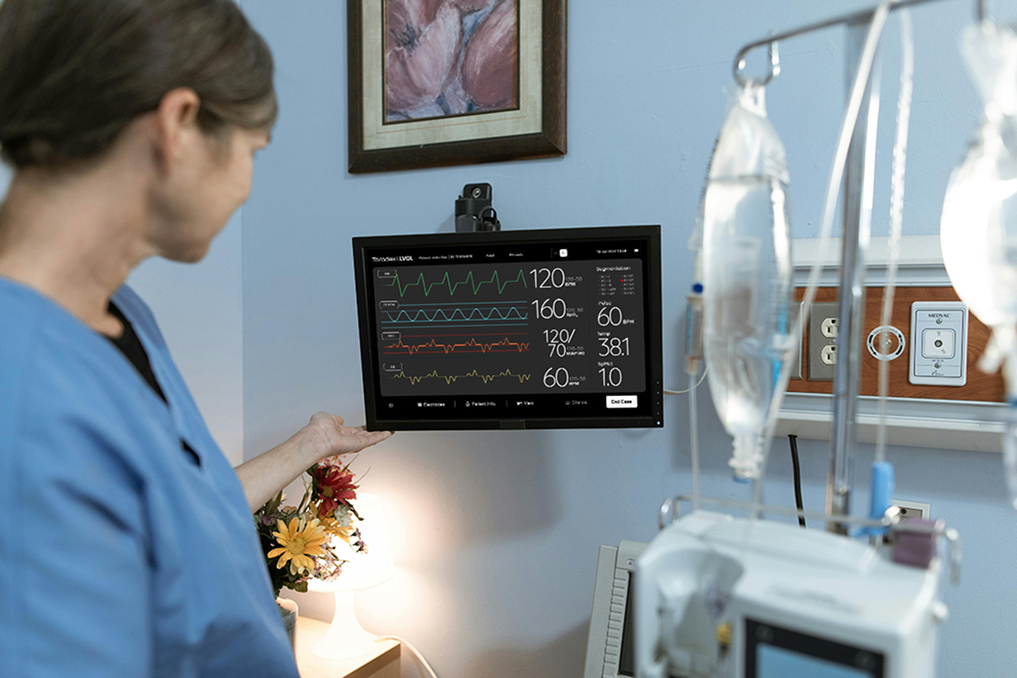
What Can We Offer?
Why Users Should Care?
We selected these pain points from our research, focusing on three that could be quickly solved using our client’s hardware and the LVGL graphics library for fast, interactive refreshes.
A HUGE Graphic Library OF COMPONENTS,
BUT WHICH ONE COULD RELIEVE PAIN POINTS?
LVGL is a graphics library, written in C, that lets developers create embedded GUIs using a comprehensive set of UI elements. While the UI elements by themselves don’t resolve any problems, the way we combine them allows us to meet critical user needs effectively.
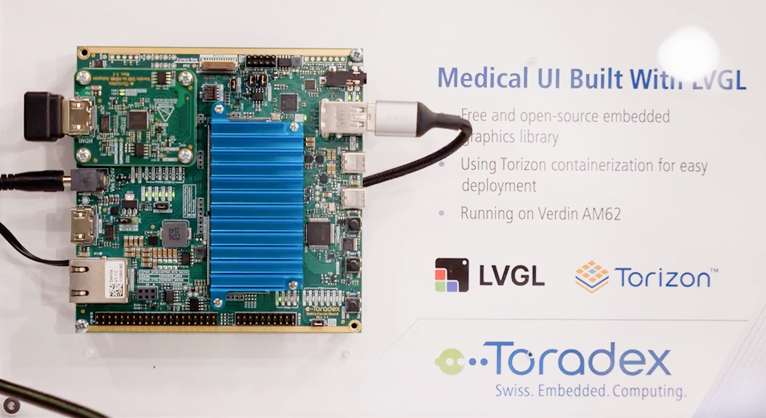
How does this piece of technology solves Medical CHALLENGES?
The same goes for touchscreen performance. It’s not easy for such a constrained device to respond to touch input as smoothly as an iPad tablet would. This enabled us to play smooth transitions without having to display all the information on a single, static screen.
Ideation

Data Overload
Progressive Disclosure
Instead of showing all possibilities and options, reduce the number of buttons and menus, making them conditional.

Alarm Fatigue
Selective Warnings
Instead of having general red alerts, why don't we use selective per-component alerts? Perhaps it's not a critical fault, but a dedicated parameter-specific alert that isolates the critical issue without overwhelming the interface.

Low Visibility
Adaptive color scheme
Instead of having a single static screen scheme, we could implement context-aware dark and light modes that adapt to clinical lighting conditions
Prototyping:
Solution Development
Presenting Data Through Progressive Disclosure
Here you can see a good example: the green button for recording the 12 leads appears only when necessary, specifically when the user selects the 12-lead screen. We tried to position the minimum amount of information, but in the boldest way possible.
It must be noted that, as this project was a demo, we didn't want to implement every single ECG functionality, as doing so would have been extremely time-consuming and would have had little impact in our trade fair context.
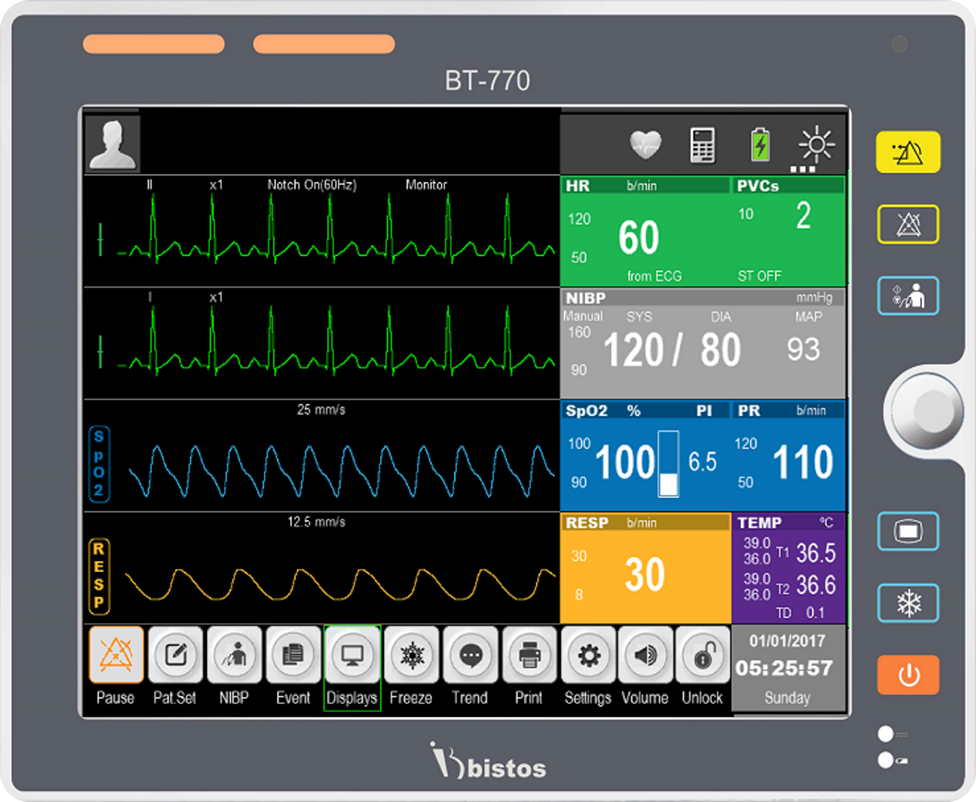
Here is another real ECG, so you can see how overcrowded those screens can be.
Selective Warnings
vs Alarm Fatigue
Instead of overwhelming users with multiple simultaneous alarms, our system implemented a focused hierarchy approach.
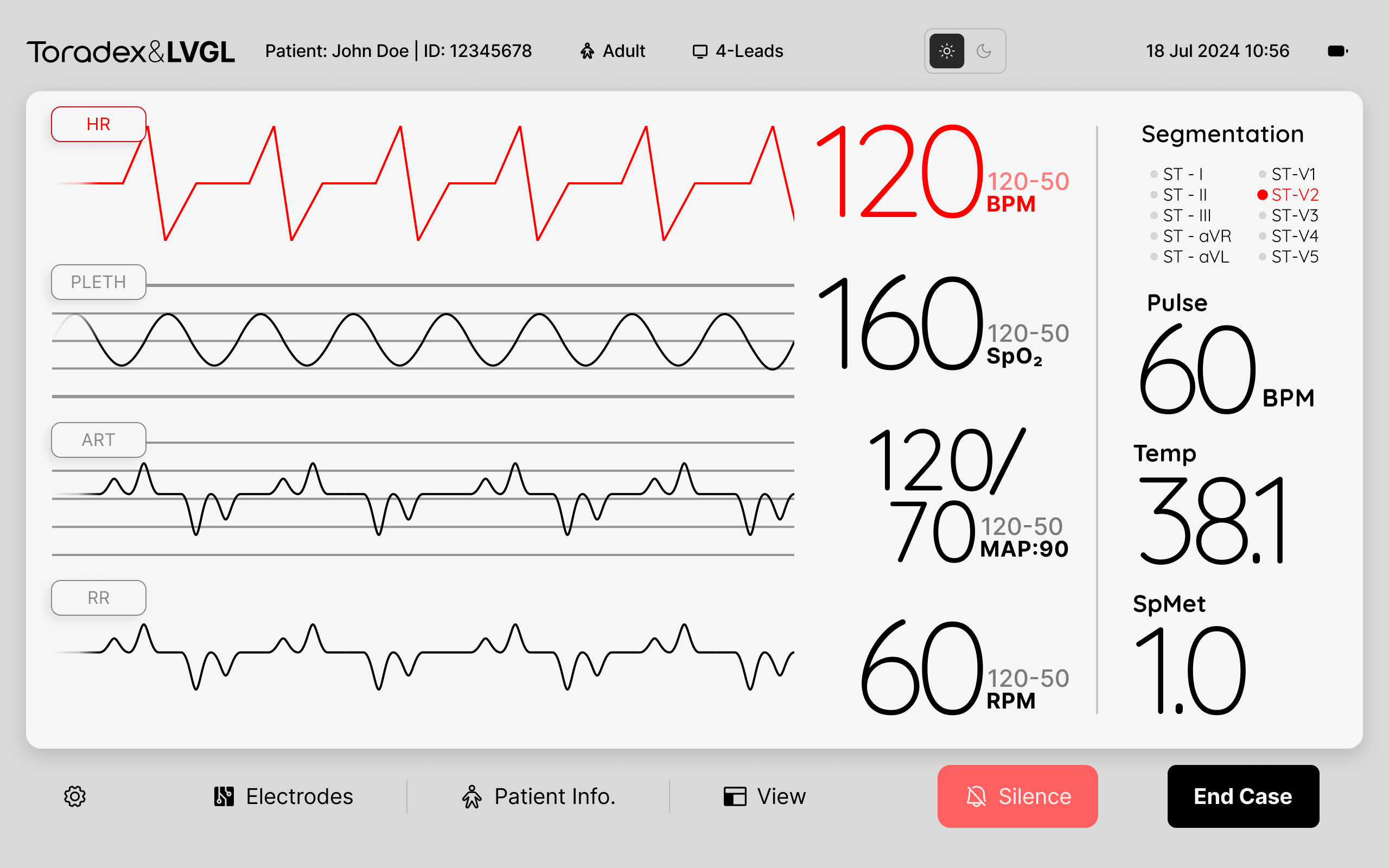
Single-Focus Alert System:
When any alarm triggers, ALL other waveform elements automatically switch to "disabled mode" (muted, lower contrast colors).
Only ONE critical parameter displays in "alarm state" at a time. This ensures clinical staff can "immediately focus on the critical point" without visual chaos.
Example of a conventional alarm sign.
Dark & Light Mode
Something that can feel almost supernatural on our smartphones or computers—the ability to switch between dark and light mode—could become revolutionary in the embedded world. Because of the nature of C code, it often feels less manageable and harder to scale. That’s why LVGL initiated an approach to bridge the gap between modern design practices and embedded devices. They achieved this by adopting an XML-based solution, which translates directly into C code. XML closely resembles HTML, the foundation of many contemporary design tools like Figma.
Making Learning Curve Easier
Patient Data Introduction:
New clinicians struggled with complex medical interfaces, so we implemented Apple-style keyboards and smartphone-like interactions for patient data entry, enabling immediate operation through existing muscle memory rather than device-specific training.
Electrode placements:
One challenge was that new clinicians often struggled to remember proper electrode placement for ECG measurements. Therefore, providing the ability to store and display the appropriate tutorial video directly on the monitor could be a key advantage of LVGL, as this is a relatively uncommon technical achievement.
Design Challenges & Alternative Concepts
Complex embedded medical interface design required systematic constraint navigation through iterative testing and technical validation.
White Canvas Paralysis Solution:
Used v0.dev AI prototyping to rapidly generate foundational wireframes with core components, then transferred HTML artifacts to Figma using plugins to accelerate initial concept development.
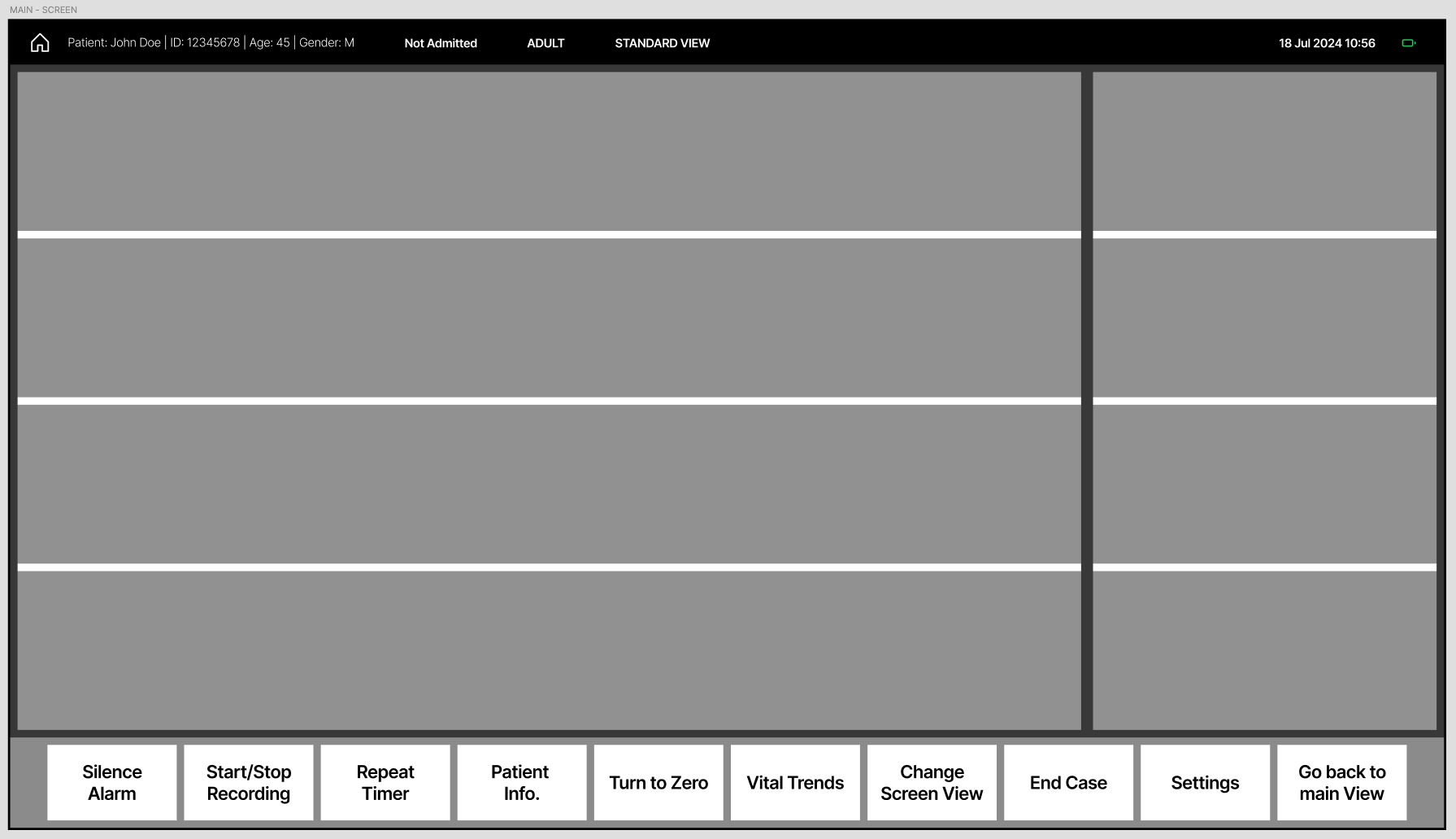
Here, you can see an AI-generated wireframe that I've created as a starting point.
Ergonomic Validation
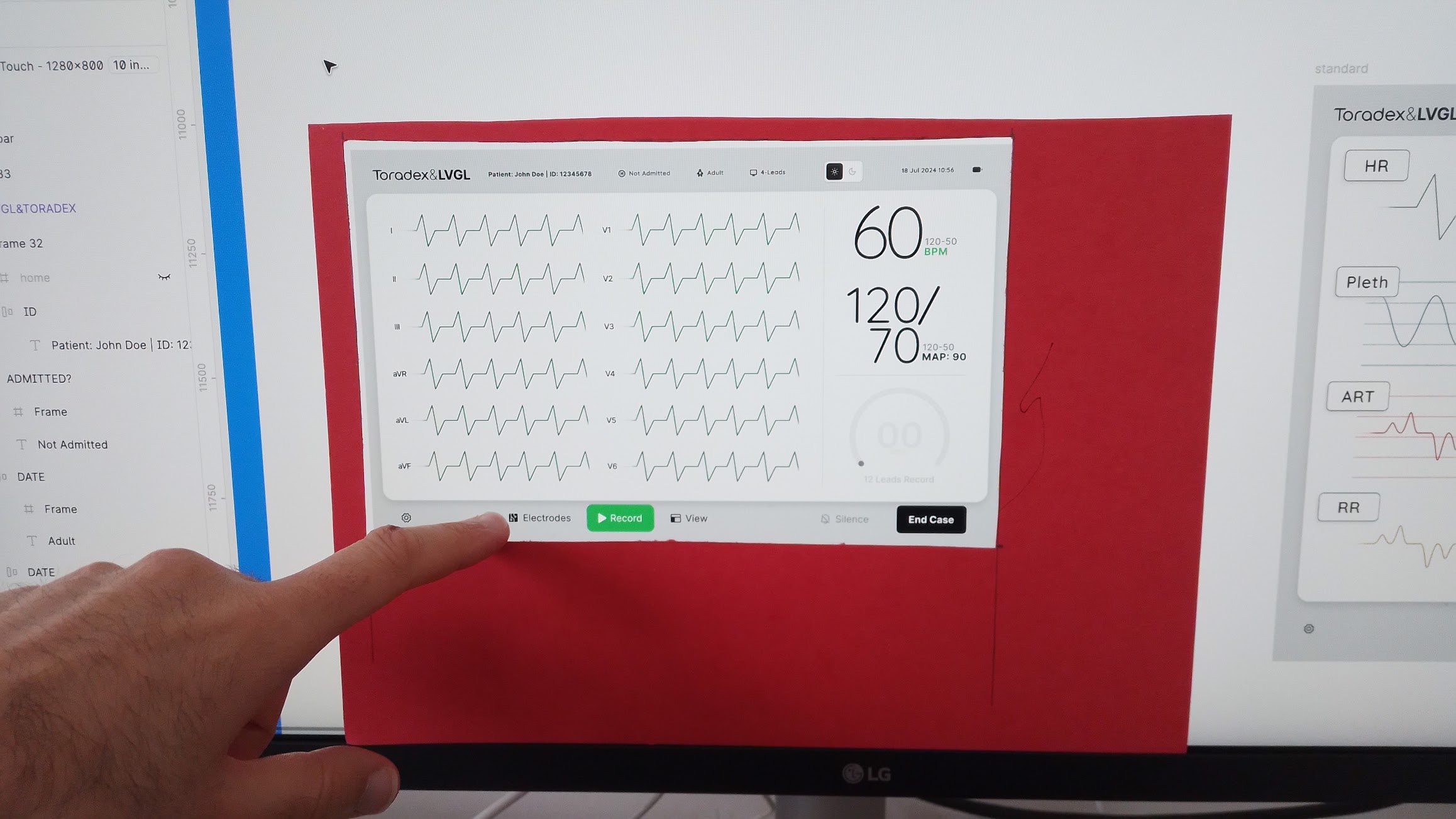
Physical 10-inch device testing revealed critical minimum touch target requirements that couldn't be determined through desktop design alone, forcing multiple interface scale adjustments.
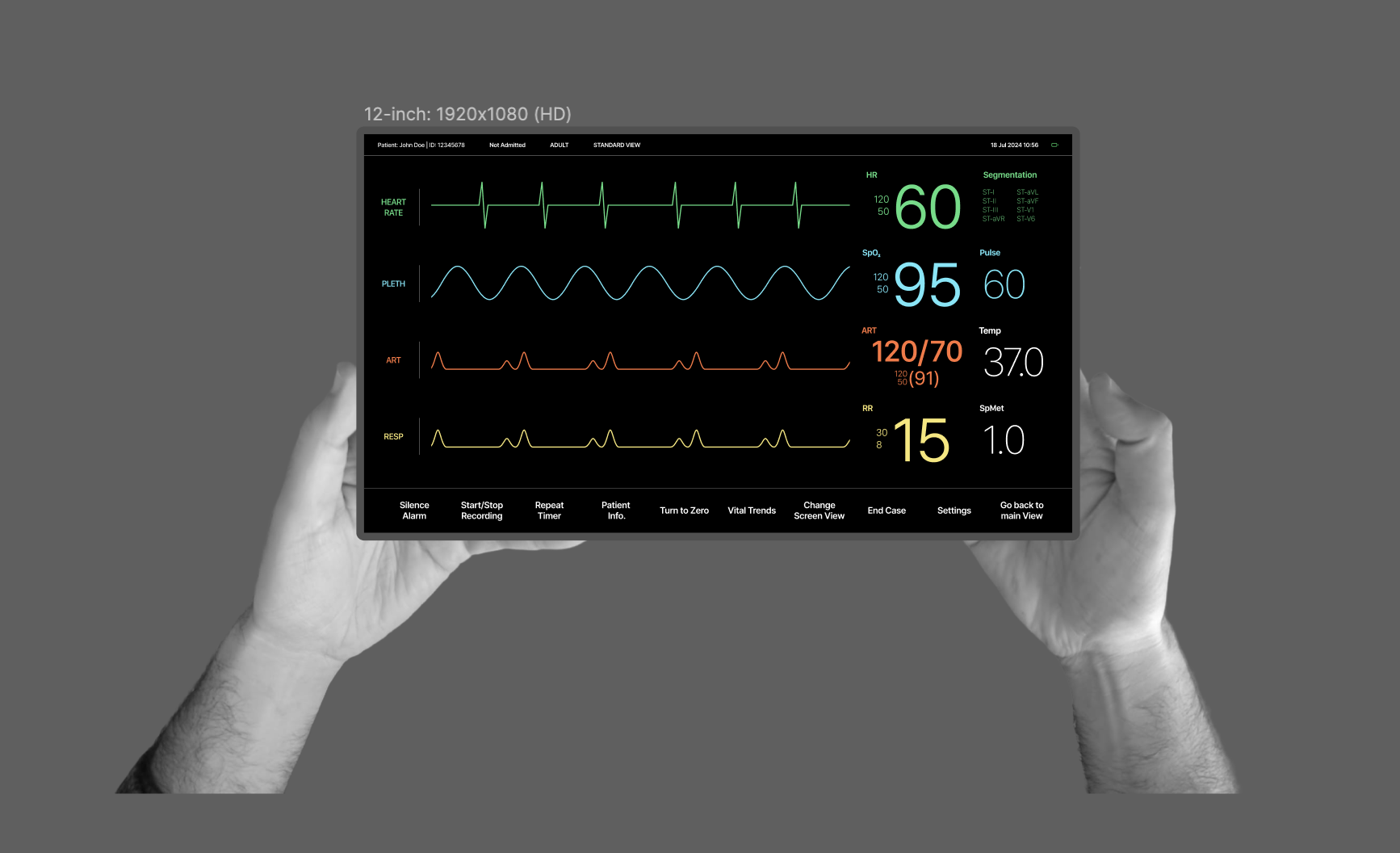
I wanted to use Figma with this mock-up I created of my own hand holding the 10-inch ECG monitor, so I always have an idea of the dimensions of the UI elements.
Rejected Version - The Laser Effect
Rejected visually appealing concepts like the "shiny dot effect" waveform animation because Figma's background blur and blending modes couldn't translate to C code implementation within embedded system limitations.
Developer Handoff Optimization
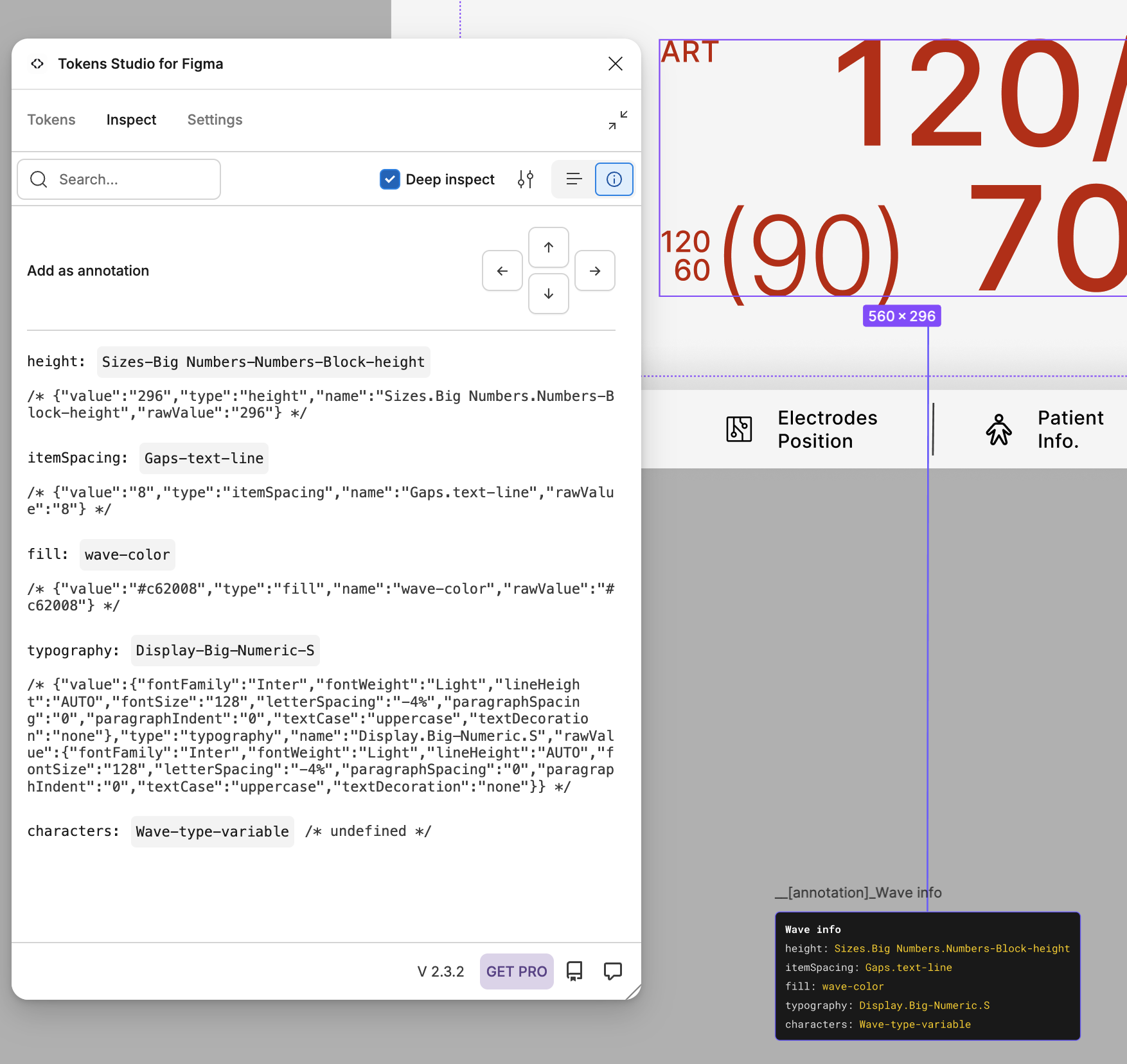
Rejected visually appealing concepts like the "shiny dot effect" waveform animation because Figma's background blur and blending modes couldn't translate to C code implementation within embedded system limitations.
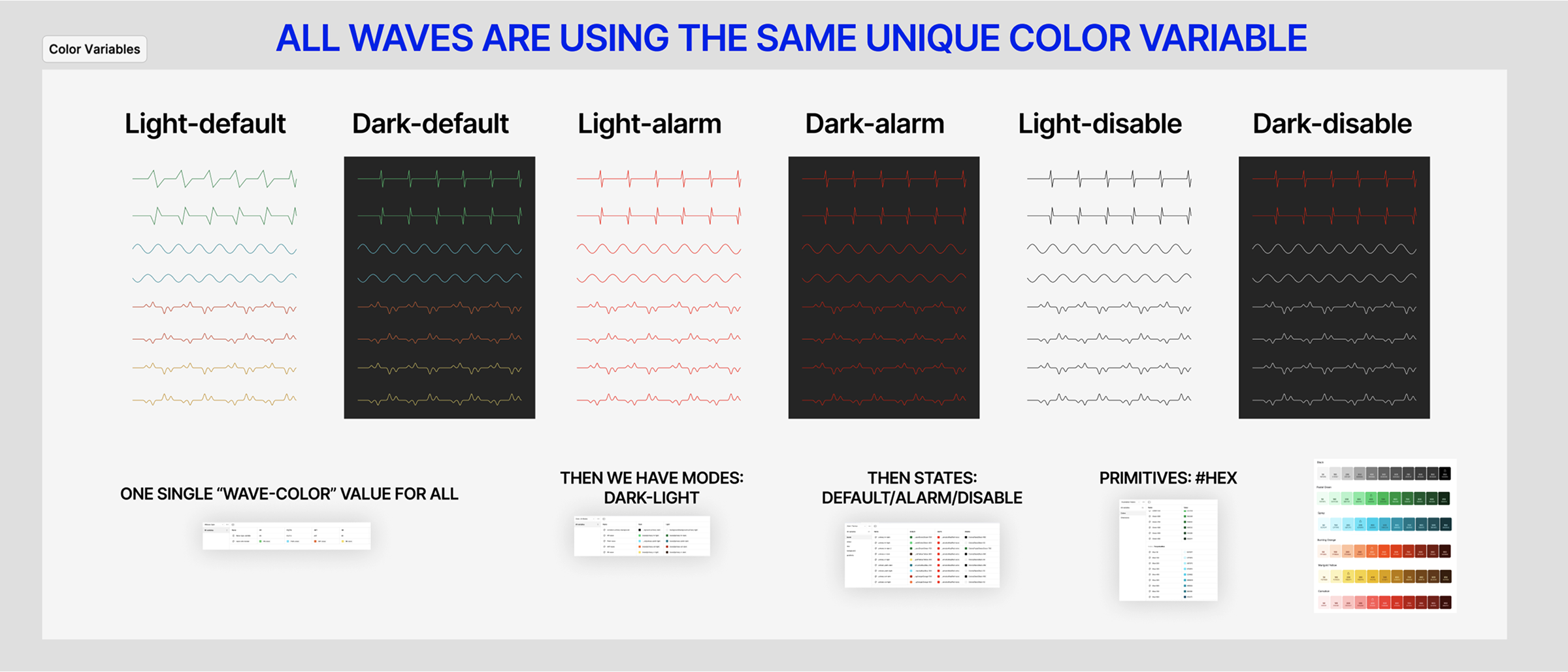
Explanation of the components, structures, and color Variables
Impact
The ECG demo was successfully deployed at Embedded World 2025, running on Toradex's Verdin AM62 hardware as planned. The interface demonstrated medical-grade authenticity that resonated with industry professionals, generating productive discussions with medical technology specialists about embedded system capabilities for healthcare applications.
+1 Ready
Contributed to LVGL's ready-made demo ecosystem, with ECG interface demonstrating professional medical UI capabilities within embedded constraints.
4Weeks
Streamlined Developer Implementation Through Systematic Design Architecture. "The token structure made immediate sense" - Liam Howart, Embedded Systems Developer
Client Advocacy
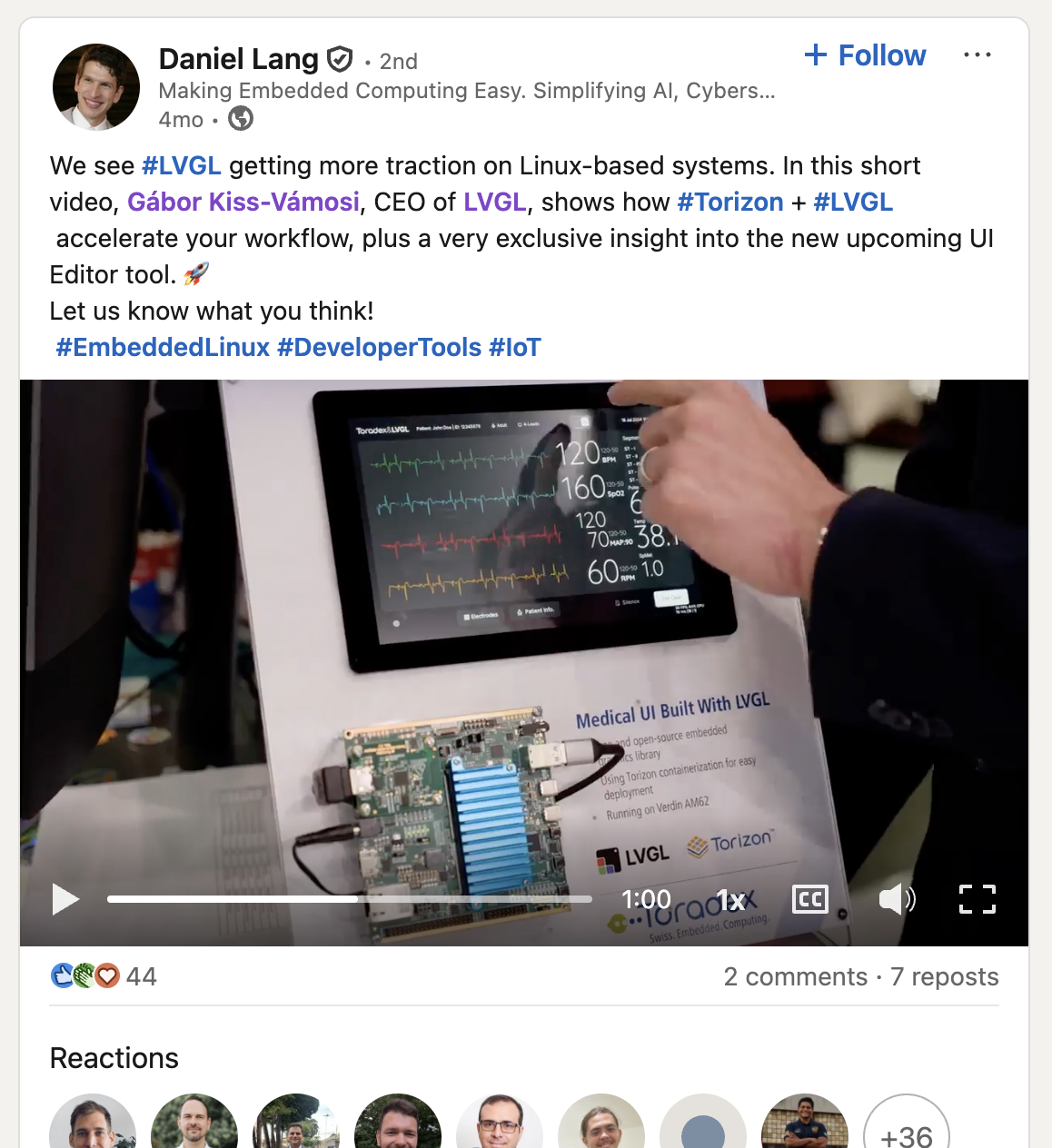
The strongest project impact came when Daniel Lang (Toradex partner) independently promoted our ECG demo on LinkedIn, featuring it as proof of LVGL + Torizon capabilities to his professional network. When clients voluntarily stake their reputation on your work, it validates that the design exceeded technical requirements and achieved genuine business value.
Takeaways
01
Domain Expertise
Because of this project, I realized how overwhelming it can feel to deep dive into a new domain, so it’s essential to stick to the design thinking methodology to avoid Analysis paralysis.
02
Technical Constrains & Ergonomy
Designing for NON-Standard screens move you out from your confort zone. The Embedded screen don’t have same pixel density as mobile or computer screens. So in order to calculate ERGONOMIC confortable size, you need to leverage your expertise and intuition. Don't trust web-based measures because those do not correlate same sices in real world. You need to start on finger sizes rather than than in pixels.
03
The Sweet Spot
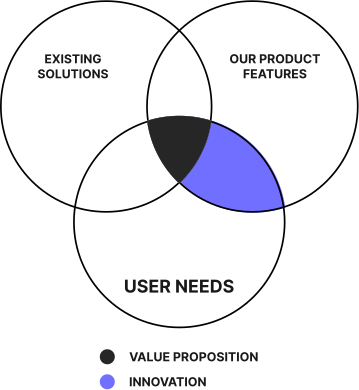
This project taught me the importance of choosing what truly matters. With thousands of possible LVGL graphics for the UI, countless existing solutions from other ECG monitors, and many identified user needs, I decided to concentrate on refining the current GUIs. However, I also aimed to innovate by addressing user requirements that had not been previously met.

For more visual design jobs
request my private portfolio.
INFO@SAMUELGARIJO.COM
or
Book a free consultation ⇩
If you don't see the calendar, refresh the page.
Services
Web design and dev.
UI/UX Design
Marketing Production
Consultation
Trusted By
Ralph Lauren
Facebook
Doordash
LVGL